iOS App Support
BCRD is always looking for ways to improve user experience. If you have any questions or concerns, please email info@bcrd.org
Privacy Policy
Last updated: July 30, 2024
This Privacy Policy describes Our policies and procedures on the collection, use and disclosure of Your information when You use the Service and tells You about Your privacy rights and how the law protects You.
We use Your Personal data to provide and improve the Service. By using the Service, You agree to the collection and use of information in accordance with this Privacy Policy.
Interpretation and Definitions
Interpretation
The words of which the initial letter is capitalized have meanings defined under the following conditions. The following definitions shall have the same meaning regardless of whether they appear in singular or in plural.
Definitions
For the purposes of this Privacy Policy:
- Account means a unique account created for You to access our Service or parts of our Service.
- Affiliate means an entity that controls, is controlled by or is under common control with a party, where "control" means ownership of 50% or more of the shares, equity interest or other securities entitled to vote for election of directors or other managing authority.
- Application refers to BCRD, the software program provided by the Company.
- Company (referred to as either "the Company", "We", "Us" or "Our" in this Agreement) refers to Blaine County Recreation District, 1050 Fox Acres Drive.
- Country refers to: Idaho, United States
- Device means any device that can access the Service such as a computer, a cellphone or a digital tablet.
- Personal Data is any information that relates to an identified or identifiable individual.
- Service refers to the Application.
- Service Provider means any natural or legal person who processes the data on behalf of the Company. It refers to third-party companies or individuals employed by the Company to facilitate the Service, to provide the Service on behalf of the Company, to perform services related to the Service or to assist the Company in analyzing how the Service is used.
- Usage Data refers to data collected automatically, either generated by the use of the Service or from the Service infrastructure itself (for example, the duration of a page visit).
- You means the individual accessing or using the Service, or the company, or other legal entity on behalf of which such individual is accessing or using the Service, as applicable.
Collecting and Using Your Personal Data
Types of Data Collected
Personal Data
While using Our Service, We may ask You to provide Us with certain personally identifiable information that can be used to contact or identify You. Personally identifiable information may include, but is not limited to:
- Email address
- First name and last name
- Phone number
- Address, State, Province, ZIP/Postal code, City
- Usage Data
Usage Data
Usage Data is collected automatically when using the Service.
Usage Data may include information such as Your Device's Internet Protocol address (e.g. IP address), browser type, browser version, the pages of our Service that You visit, the time and date of Your visit, the time spent on those pages, unique device identifiers and other diagnostic data.
When You access the Service by or through a mobile device, We may collect certain information automatically, including, but not limited to, the type of mobile device You use, Your mobile device unique ID, the IP address of Your mobile device, Your mobile operating system, the type of mobile Internet browser You use, unique device identifiers and other diagnostic data.
We may also collect information that Your browser sends whenever You visit our Service or when You access the Service by or through a mobile device.
Use of Your Personal Data
The Company may use Personal Data for the following purposes:
- To provide and maintain our Service, including to monitor the usage of our Service.
- To manage Your Account: to manage Your registration as a user of the Service. The Personal Data You provide can give You access to different functionalities of the Service that are available to You as a registered user.
- For the performance of a contract: the development, compliance and undertaking of the purchase contract for the products, items or services You have purchased or of any other contract with Us through the Service.
- To contact You: To contact You by email, telephone calls, SMS, or other equivalent forms of electronic communication, such as a mobile application's push notifications regarding updates or informative communications related to the functionalities, products or contracted services, including the security updates, when necessary or reasonable for their implementation.
- To provide You with news, special offers and general information about other goods, services and events which we offer that are similar to those that you have already purchased or enquired about unless You have opted not to receive such information.
- To manage Your requests: To attend and manage Your requests to Us.
- For business transfers: We may use Your information to evaluate or conduct a merger, divestiture, restructuring, reorganization, dissolution, or other sale or transfer of some or all of Our assets, whether as a going concern or as part of bankruptcy, liquidation, or similar proceeding, in which Personal Data held by Us about our Service users is among the assets transferred.
- For other purposes: We may use Your information for other purposes, such as data analysis, identifying usage trends, determining the effectiveness of our promotional campaigns and to evaluate and improve our Service, products, services, marketing and your experience.
We may share Your personal information in the following situations:
- With Service Providers: We may share Your personal information with Service Providers to monitor and analyze the use of our Service, to contact You.
- For business transfers: We may share or transfer Your personal information in connection with, or during negotiations of, any merger, sale of Company assets, financing, or acquisition of all or a portion of Our business to another company.
- With Affiliates: We may share Your information with Our affiliates, in which case we will require those affiliates to honor this Privacy Policy. Affiliates include Our parent company and any other subsidiaries, joint venture partners or other companies that We control or that are under common control with Us.
- With business partners: We may share Your information with Our business partners to offer You certain products, services or promotions.
- With other users: when You share personal information or otherwise interact in the public areas with other users, such information may be viewed by all users and may be publicly distributed outside.
- With Your consent: We may disclose Your personal information for any other purpose with Your consent.
Retention of Your Personal Data
The Company will retain Your Personal Data only for as long as is necessary for the purposes set out in this Privacy Policy. We will retain and use Your Personal Data to the extent necessary to comply with our legal obligations (for example, if we are required to retain your data to comply with applicable laws), resolve disputes, and enforce our legal agreements and policies.
The Company will also retain Usage Data for internal analysis purposes. Usage Data is generally retained for a shorter period of time, except when this data is used to strengthen the security or to improve the functionality of Our Service, or We are legally obligated to retain this data for longer time periods.
Transfer of Your Personal Data
Your information, including Personal Data, is processed at the Company's operating offices and in any other places where the parties involved in the processing are located. It means that this information may be transferred to — and maintained on — computers located outside of Your state, province, country or other governmental jurisdiction where the data protection laws may differ than those from Your jurisdiction.
Your consent to this Privacy Policy followed by Your submission of such information represents Your agreement to that transfer.
The Company will take all steps reasonably necessary to ensure that Your data is treated securely and in accordance with this Privacy Policy and no transfer of Your Personal Data will take place to an organization or a country unless there are adequate controls in place including the security of Your data and other personal information.
Delete Your Personal Data
You have the right to delete or request that We assist in deleting the Personal Data that We have collected about You.
Our Service may give You the ability to delete certain information about You from within the Service.
You may update, amend, or delete Your information at any time by signing in to Your Account, if you have one, and visiting the account settings section that allows you to manage Your personal information. You may also contact Us to request access to, correct, or delete any personal information that You have provided to Us.
Please note, however, that We may need to retain certain information when we have a legal obligation or lawful basis to do so.
Disclosure of Your Personal Data
Business Transactions
If the Company is involved in a merger, acquisition or asset sale, Your Personal Data may be transferred. We will provide notice before Your Personal Data is transferred and becomes subject to a different Privacy Policy.
Law enforcement
Under certain circumstances, the Company may be required to disclose Your Personal Data if required to do so by law or in response to valid requests by public authorities (e.g. a court or a government agency).
Other legal requirements
The Company may disclose Your Personal Data in the good faith belief that such action is necessary to:
- Comply with a legal obligation
- Protect and defend the rights or property of the Company
- Prevent or investigate possible wrongdoing in connection with the Service
- Protect the personal safety of Users of the Service or the public
- Protect against legal liability
Security of Your Personal Data
The security of Your Personal Data is important to Us, but remember that no method of transmission over the Internet, or method of electronic storage is 100% secure. While We strive to use commercially acceptable means to protect Your Personal Data, We cannot guarantee its absolute security.
Children's Privacy
Our Service does not address anyone under the age of 13. We do not knowingly collect personally identifiable information from anyone under the age of 13. If You are a parent or guardian and You are aware that Your child has provided Us with Personal Data, please contact Us. If We become aware that We have collected Personal Data from anyone under the age of 13 without verification of parental consent, We take steps to remove that information from Our servers.
If We need to rely on consent as a legal basis for processing Your information and Your country requires consent from a parent, We may require Your parent's consent before We collect and use that information.
Links to Other Websites
Our Service may contain links to other websites that are not operated by Us. If You click on a third party link, You will be directed to that third party's site. We strongly advise You to review the Privacy Policy of every site You visit.
We have no control over and assume no responsibility for the content, privacy policies or practices of any third party sites or services.
Changes to this Privacy Policy
We may update Our Privacy Policy from time to time. We will notify You of any changes by posting the new Privacy Policy on this page.
We will let You know via email and/or a prominent notice on Our Service, prior to the change becoming effective and update the "Last updated" date at the top of this Privacy Policy.
You are advised to review this Privacy Policy periodically for any changes. Changes to this Privacy Policy are effective when they are posted on this page.
Contact Us
If you have any questions about this Privacy Policy, You can contact us:
- By email: info@bcrd.org
Account Setup and Use
Before you can register for recreation programs or buy season passes online, you will need to create an account.
- Go to https://bcrd.perfectmind.com/
- Click on “Signup” to create a new account.
- Fill in your information
- Fill in the required information on the “Don't Have a Log in Yet?” page.
- Submit your information
- Click on “Submit” to finish creating your account and be automatically logged in. You will also receive an email with a temporary password to log in with.
- Create a new password
- In the “My Info” tab, click on “Manage Login”. Enter the temporary password you received via email into the “current password” box. Create your new password below and click “Save”.
- Add Family Members
- Use the “Add Family Member” button to add household members to your account. This will allow you to manage activity registrations and passes for your family.
- Add a Credit Card
- Adding a credit card to your account will make registering for activities and purchasing passes quicker.
- Select "My Info" under the "Home" button.
- Select your name to view your account details.
- Scroll to the bottom of the page and click the purple "+ New" button next to Finance Info to enter credit card information.

You can browse and register for recreation programs through BCRD’s online registration system. If you haven’t created an account please follow the directions above.
- Go to Activity Registration
- Once you have logged into your account, click on the “Activity Registration” tab at the top of the page. If viewing on a mobile device, click the menu (≡) in the top left corner.
- Browse program options
- Programs are divided by type and you will be able to find your activity listed under one of the following categories: Adult Sports, Aquatics, FitWorks, HUB-Childcare, and Youth Sports.
- You can filter program and course options by “Age”, “Days of Week”, and “Date Range” on the left side of the page or by selecting the filter symbol on a mobile device. If you know the specific program you are interested in, you can type it into the search bar in the top right of the page.
- View program details
- Once you find the activity you are interested in, click on the link to take you the different options that are offered. Click on “Show” to see program offerings, including price range, times and dates and applicable age ranges.
- To view the program or course description, hover your cursor over the small “i” icon next to the course name.
- Select a program
- Click on the blue “More Info/Register” button to select the program or course you are interested in. You will be able to review all the program details on the next page. If a program is open for registration, click “Register”. If registration is not open yet, you will not be able to navigate past this page.
- Choose attendees
- Select the name of who is signing up for the program. Your name will be here and any family members you may have added. Click “Next”.
- If you have not added the family member you would like to register, go back to the “My Info” tab and click “Add Family Member”
- Agree to waiver
- If the program has a waiver, read the waiver, and check off the agree box at the bottom. Click “Next”.
- Review your selection
- Review your program selection details. Click “Modify Booking” to edit any information from the previous pages. You can return to this page at any time by clicking on “Booking Summary” at the top right of the page. Click “Checkout” to proceed to payment.
- Payment
- Fill in your payment information. You can pay by credit card or by account credit from previous refunds. Click “Place My Order” to complete registration. If you have a promotional code, enter it on this screen on the bottom left.
Google Chrome is the optimal browser for our Online Registration system for desktop computers. Mobile users may find it easier to navigate using Safari.
- It is recommended to register online when possible as we experience high call volume when registration opens.
- You can conveniently keep credit card information on file (if you choose to) so you don’t have to fill it out each time.
On registration opening days, be prepared ahead of time!
- Search the courses offered, write down course ID numbers of programs you want to register in. This number can be used as a keyword search later to easily find what you want.
- Ensure you have created individual profiles for any family members you plan to register into a program
- Login prior to when registration opens
- Have the page open to the program you want to first register in, refresh when the time hits, click register, follow through the prompts (attendees, questionnaires), and at the review page, you can return to the landing page to add your next course
- Search by course number, or keyword for additional programs you would like to register in
- There is a 3 minute hold timer – your spot(s) will be released if you are inactive for 3 minutes.
- When waitlists are available, join the waitlist! You will be contacted if a spot becomes available.
You can buy Nordic, Aquatic Center, and FitWorks passes with your BCRD account. If you haven’t created an account, please follow the directions above.
- Go to “Buy Passes”
- Once you have logged into your account, click on the “Buy Passes” tab at the top of the page. If viewing on a mobile device, click the menu (≡) in the top left corner.
- The drop-down menu lists activities that have pass options.
- Select the Type of Pass You Want to Purchase
- When selecting a pass to purchase, you can choose individual family members for multiple passes. If you're buying a family pass, make sure to select all family members who will use the pass.
- If a pass has age restrictions, a red warning will appear under a participant's name who is not in the correct age range for the pass. In such cases, you won't be able to check the selection box next to their name.
- Select “Add to Cart” to proceed to the payment screen.
- Promotional Codes
- When viewing on a larger screen, enter promotional codes on the checkout screen on the bottom right.
- When viewing on a mobile device, select “Show Order Summary” at the top of the screen to see the promotional code field.
- Payment
- Fill in your payment information. You can pay by credit card or by account credit from previous refunds. Click “Place My Order” to complete your purchase.
- Log into BCRD's recreation management system at bcrd.perfectmind.com.
- NOTE: If there are multiple clients on your Family Account, you need to click on the client you wish to withdraw.
- After selecting a client account, Scroll down to the section titled "Schedules" and click on "Switch to List View". Here you will see all activities you are registered in.
- Select "Actions" to the right of the activity you would like to withdraw from and click "Withdraw".
- A summary pop up will display the amount paid, and withdrawal fee if applicable. Withdrawals are returned to account credit. If paid by credit card, you will receive the option to refund to original payment method. Then click "Withdraw".
- A confirmation document will display. Once completed, you will see the program or drop-in status as "Canceled" under your attendance history.
Account Mangement
With BCRD's online recreation program registration system, you can search and register for available courses and programs, pre-register and withdraw for Drop-In Activities, purchase facility and Nordic passes, view your family’s program schedules, view activity outcomes (grades), and view recreation-related financial history.
You have successfully registered when you click “Checkout” on the payment screen. You will receive a confirmation email with your registration confirmation and receipt.
If you do not receive an email confirmation, check the family member’s profile to ensure an email address is entered.
You can also view your current registrations by clicking on My Info and navigating to “Schedule”.
Login to your account at https://bcrd.perfectmind.com, click on My Info, then select the family member you want to see details on.
Under the family member’s name, you will see tiles that indicate each one of their passes. You can see when the pass expires.
Click on My Info, navigate to the family member registered, and scroll to “Schedule”. You can view in a calendar format or click “Switch to List View” to see a listing of courses.
Yes, you can login, add, and update many areas of your account information, including:
- Emergency contacts
- Important medical information
- Phone numbers, mailing address
- Add a credit card to your account for easier checkout
To see your information, login, select My Info, click on the family member you would like to update, and select “Edit”.
No, you can still search for programs and activities and see availability without an online account, however; you will need to have an online account to register for programs and activities through BCRD’s recreation management system.
BCRD's recreation management system requires that you have an active email address to access your online account.
However, you can still create an account and register by calling (208) 578-2273 or visiting the BCRD FitWorks or Aquatic Center front desk in person.
We do not pause facility passes currently. We do consider prorated refunds for medical or relocation reasons when acceptable documentation is provided.
Depending on the program or activity, you may need to be the age by the start date of a course, end date of a course, or by a certain date; so you may not meet the age restrictions of that specific course.
Ensure that the ages on your account are correct. If you have questions about age restrictions, contact customer service at (208) 578-2273 for assistance.
Click My Info, choose the family member you want to see, scroll to “Attendance”, and on the right side of the header, change the drop-down menu to “Waitlists Online”.
Visit https://bcrd.perfectmind.com to access the login page.
Click on “Forgot password?”, enter your email address, click “Reset password”, and you will receive an email with instructions on how to reset your password.
If you do not receive the password reset email after a few minutes, please call (208) 578-2273 or email info@bcrd.org for assistance.
If you receive a notification that you are locked out, please call (208) 578-2273 or email info@bcrd.org for assistance.
Yes, when adding a family member, you can add their email address in their account profile if you would like them to be able to login directly to their individual profile.
You then need to contact (208) 578-2273 to have customer service activate their individual login.
The family member will be able to register themselves online with their individual login
As the primary account holder, you can still register and view schedules, transactions, etc. for that family member.
Login to your account at https://bcrd.perfectmind.com, click on My Info, select a family member, and you can see any shared credit available on the right side of the screen.
Additional Questions
BCRD's recreation management system meets industry standard security certification including PCI-DSS Level 1 for credit card data and TLS 1.2 over HTTPS for account protection. Please ensure you use a strong password on your account and do not share your account information with anyone.
You will need a credit card to register online if your online account does not have existing account credit.
If you do not have a credit card, you can visit the FitWorks or Aquatic Center front desk in person and purchase account credit to be applied onto your account.
Once the credit is applied to your account, you will be able to register and use your account credit to make payments. Please ensure you have enough account credit available to cover the full cost of your registration(s).
Yes, you can create an account and register online regardless of where you live.
Yes. BCRD's Recreation management system is mobile friendly and can be accessed using a computer, phone, or tablet, any time of the day.
Chrome is the optimal browser to use on a desktop computer.
Mobile users may find it easier to navigate using Safari or Chrome.
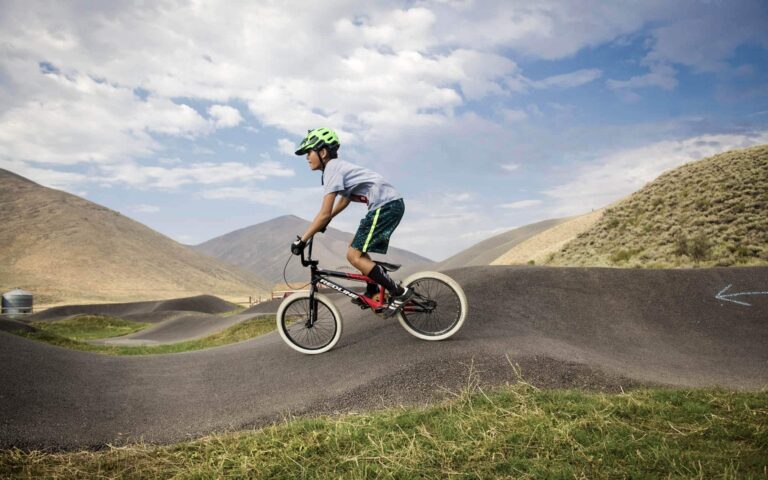
Pump Track
A continuous circuit of dirt rollers, berms and jumps that loop back on themselves, allowing you to ride continuously. The goal is to make loops on the track using the features to gain speed without pedaling.
Jump Lines
Three progressions of jump lines designed so that when you land one jump, you’re set up for the next. There are jumps for beginner, intermediate, and advanced levels, allowing you to build confidence and skills on the easier lines before moving up to the next.
Flow Trails
Flow trails emphasize speed and rhythm, and are offered for beginner, intermediate, and advanced riders. The trails includes berms, rollers, jumps, and other features that are designed in a way that uses the rider’s momentum to minimize pedaling and braking.
Skills Area
The skills area is for riders to practice bike balance and handling to get you ready for the trails.
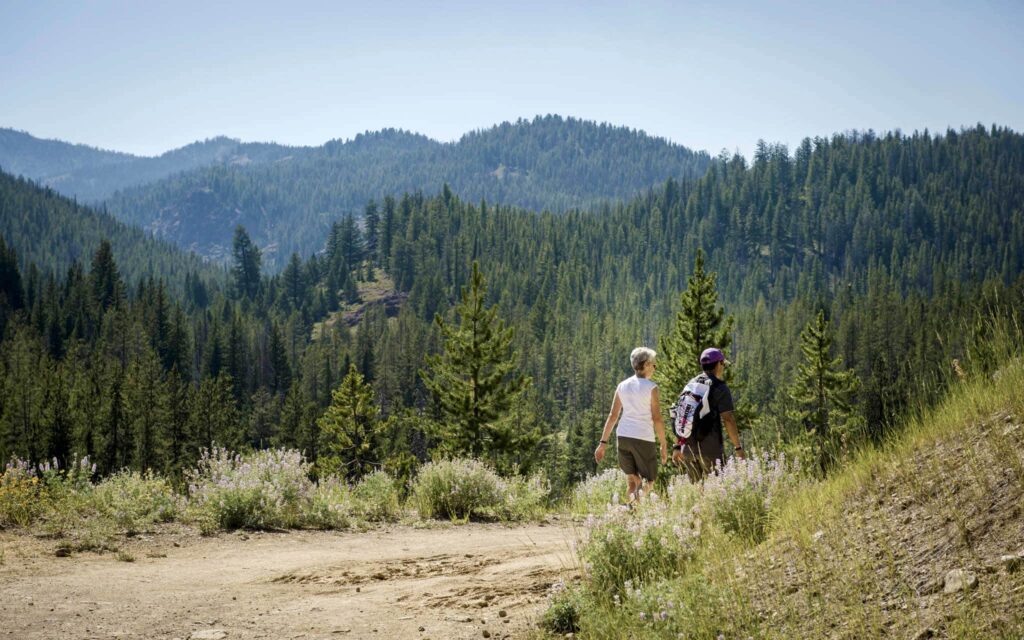
Quigley Loop Trail
In the summer months the Trail provides walking, biking, equestrian and scenic viewing opportunities for all ages and abilities. In winter, the Trail is groomed for Nordic skiing by the BCRD and serves as a key link for the north valley BCRD Nordic Trail system.
An example of community and public agency cooperation, the BCRD began construction of the trail in 1991 with a pledge from the Mary W. Harriman Foundation. Through community support, the BCRD was able to complete the Harriman Trail in July of 2001.
In partnership with the US Forest Service, the BCRD manages and maintains the Harriman Trail year-round.
Access the Quigley Loop Trail from Quigley Canyon Road. Your use of this area is permitted by the private landowner Quigley Farm. Please respect private property by restricting your access to designated trails. This property is permanently protected by a conservation easement with the Wood River Land Trust. The Quigley Loop Trail was a collaborative effort with Quigley Farm, the Wood River Land Trust, and the BCRD.
Quigley Trail Maps
Quigley Trails Park
Quigley Trail Park features a pump track, jump lines, flow lines, and a skills area.
Quigley Loop Trail
4.2-mile loop in Quigley Canyon that is open to bicyclists, hikers, and equestrians.
Get Involved
The valued support of our community brings quality, affordable, accessible recreation to our community. Whether at Galena Lodge, out on our summer and winter trails, at the Aquatic Center, in our youth and adult sports and activities, or at FitWorks fitness center, these critical recreational programs and facilities exist because of the generosity of our supporters.
Sign up for our Newsletter.
Get updates directly in your inbox on what’s happening at BCRD!